Rootie for Microsoft Teams
Rootie delivers your learning-program reminders as personal Teams messages, with one tap to open the program, already signed in.
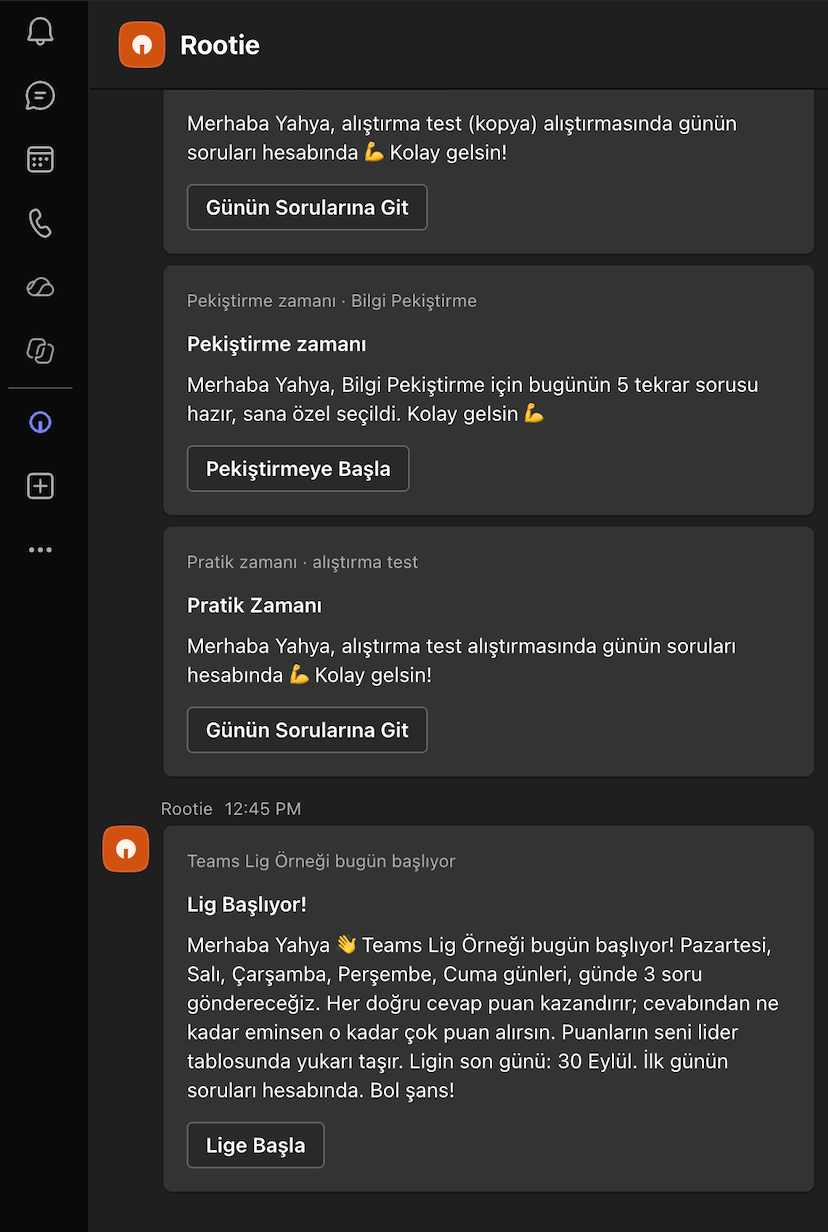
What the app does
- Sends personal reminders when a program starts, when new questions are ready, and before exams or league days.
- Each message has an Open program button that opens Rootie signed in, on the right program.
- It is notification-only: it does not read chats, channel messages, files, meetings or calendars.
For learners
- Your organisation must use Rootie and have the Teams channel turned on.
- Install Rootie from the Teams app store, or wait for your administrator to install it for you.
- The bot replies once to confirm your account is linked. Reminders follow when your programs send them.
To stop messages, uninstall the app in Teams. See Support if messages do not arrive.
For administrators
- In the Rootie admin panel, open Settings → Shop, turn on Microsoft Teams and enter your Microsoft Entra tenant ID.
- Optionally choose Grant consent with Microsoft to let Rootie install the app for your employees and match them by e-mail.
- In the Teams admin center, allow the Rootie app, or deploy it to everyone with an app setup policy.
Learners are matched to Rootie accounts by their work e-mail. The admin panel lists who can currently be reached in Teams.
Permissions
| Permission | Used for |
|---|---|
| Bot, personal scope | Sending reminders into each user’s personal chat with Rootie. |
| User.Read.All (application, with admin consent) | Matching employees to Rootie learner accounts by name and e-mail. |
| TeamsAppInstallation.ReadWriteSelfForUser.All (application, with admin consent) | Installing Rootie for employees so they receive reminders without installing it themselves. |
| GroupMember.Read.All (application, with admin consent) | Mapping Microsoft 365 groups and teams to Rootie teams. |
Details are in our Privacy Policy and Terms of Use. Questions: support@rootielearning.com.